Billing errors, delayed service, and revenue leakage often stem from disconnected restaurant and front-office systems. In many properties, a guest orders dinner to their room, the kitchen prepares it, and staff later post the charge manually to the room bill. This process slows operations, increases mistakes, and creates reconciliation issues at checkout.
Odoo for hospitality industry use cases address this by combining core ERP modules with hotel-specific solutions or integrated property-management components. In most deployments, Odoo acts as the operational backbone, while specialized hotel modules or connected PMS tools manage reservations, rooms, and guest folios. Together, these systems connect restaurant POS, kitchen workflows, inventory, purchasing, and billing into one coordinated flow. Orders, charges, and stock movements update automatically instead of being handled separately by each department.
This guide explains how the connection works in real hospitality implementations and why it matters for hotels, resorts, serviced apartments, and multi-outlet operations.
Quick Answer: How Odoo Links Kitchen POS to Guest Accounts
Odoo connects restaurant POS to guest accounts by integrating the POS system with hotel management components or a property management system (PMS). When staff assign an order to a room, the charge automatically posts to the guest’s folio, the central account that records all expenses during a stay, enabling consolidated billing at checkout while updating inventory and accounting in real time.
Typical POS-to-Room Billing Workflow in Odoo
- Order entered in restaurant POS
- Room selected and validated against active stay
- Order routed to kitchen for preparation
- Charge posted automatically to guest folio
- Payment settled at checkout or billed to account
This workflow eliminates manual transfers between departments and ensures financial accuracy.
Why Integrating Restaurant POS with Guest Accounts Matters in Hospitality
In hospitality, speed and accuracy directly affect guest satisfaction, operational efficiency, and profitability. Disconnected systems turn routine transactions into risks.
Common Problems with Disconnected Systems
Without integration between restaurant POS, property management, and accounting systems, teams face daily inefficiencies:
- Manual posting of room charges
- Missing or duplicate transactions
- Billing disputes at checkout
- Limited real-time visibility for managers
- Time-consuming night audits
Over time, these issues contribute to revenue leakage and inconsistent guest experiences.
Impact on Multi-Outlet Properties
Hotels and resorts operate multiple revenue centers, restaurants, bars, cafés, room service, spas, and events, yet guests expect one consolidated bill.
Disconnected systems make it difficult to:
- Track charges across outlets
- Manage corporate or group billing
- Monitor inventory consumption
- Forecast purchasing needs
- Produce unified financial reports
A unified hospitality ERP approach removes these blind spots.
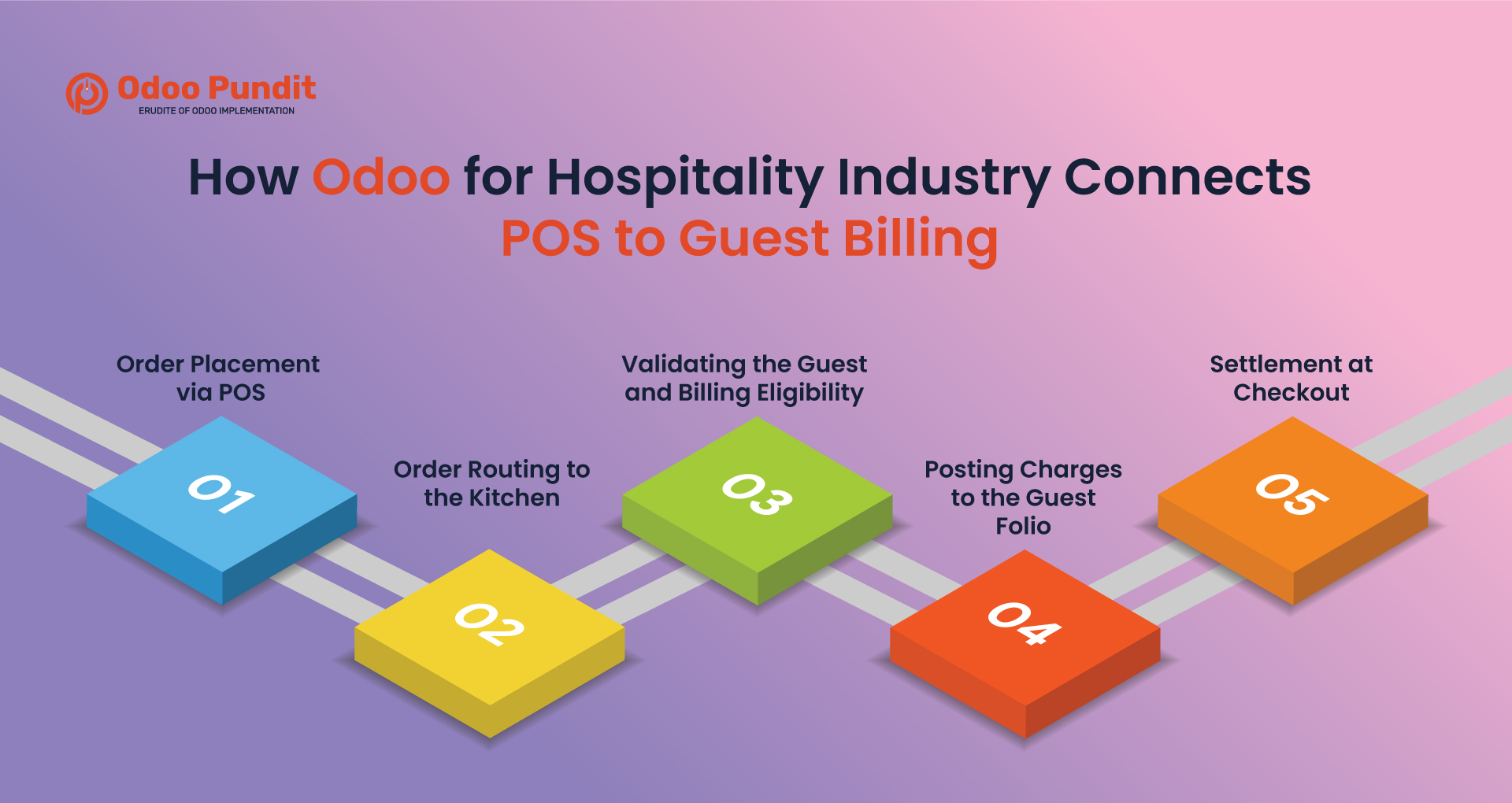
How Odoo for Hospitality Industry Connects POS to Guest Billing
In most hospitality deployments, Odoo integrates restaurant POS with hotel management components or an external property management system to link transactions to a guest’s folio.
A guest folio is the central account that records all charges incurred during a stay, including accommodation, dining, and ancillary services.
Step 1 – Order Placement via POS
Staff enter orders through a restaurant POS interface designed for speed. Orders can be assigned to:
- A table
- A room number (which loads the guest profile)
- A service type (dine-in, takeaway, room service)
For room service, selecting the room associates the order directly with the correct folio.
Step 2 – Order Routing to the Kitchen
Orders are sent digitally to kitchen staff. Depending on configuration, they may appear on:
- Kitchen display screens
- Printed preparation tickets
- Station-specific queues
Large kitchens often route items automatically to relevant preparation areas.
Step 3 – Validating the Guest and Billing Eligibility
When a room number is entered, the system checks:
- Occupancy status
- Guest identity
- Billing permissions
- Corporate or prepaid arrangements
- Credit limits or guarantees
Properties can block room charging if authorization conditions are not met.
Step 4 – Posting Charges to the Guest Folio
Once confirmed, the charge posts to the folio in real time when systems are connected. Taxes, service charges, discounts, and outlet information are applied automatically according to configured policies.
Front-desk teams do not need to re-enter the transaction.
Step 5 – Settlement at Checkout
At departure, all charges appear in one consolidated account. Staff can:
- Generate a combined invoice
- Split bills by guest or department
- Apply corporate billing arrangements
- Adjust disputed items
- Accept multiple payment methods
- Apply deposits or pre-authorizations
This significantly reduces checkout delays.
What Odoo Modules Enable POS-to-Guest Billing Integration?
The integration relies on coordinated applications rather than a single system. Core ERP modules work alongside hospitality-specific extensions.
Restaurant POS – Front-of-House Operations
The POS manages:
- Menu items and modifiers
- Table management
- Fast order entry
- Offline operation capability
For organizations planning a broader rollout, this is typically part of a larger hospitality ERP deployment strategy.
Property Management Integration
Guest profiles, reservations, and room status originate from hotel management components built on or connected to Odoo.
When a guest checks in, their folio becomes available for charges from any outlet. Depending on architecture, folio data may reside within an Odoo hotel module or in an external PMS synchronized with the ERP. Integration approaches connect booking platforms, legacy systems, or reservation tools to maintain consistent data flow across front-office and operational functions.
Room status updates ensure charges apply only to active stays.
Accounting and Financial Integration
Every POS transaction generates accounting entries automatically, enabling real-time revenue visibility.
Billing can support immediate invoicing, deferred settlement, or corporate accounts depending on operational policies.
Inventory and Purchasing Integration
Food and beverage sales deduct ingredients from inventory automatically when recipes or consumption rules are configured. This links the kitchen activity directly to stock levels and procurement planning. Inventory tracking can also support batch or expiry management for regulated food items, depending on configuration.
Approval workflows can generate purchase requests when inventory falls below thresholds, helping maintain supply continuity.
How Purchasing Automation Responds to POS Demand
Integrated ERP systems connect sales activity directly to procurement decisions.
Real-Time Inventory Consumption
Recipes define ingredient usage per dish, allowing stock updates immediately after each order.
Automatic Replenishment
Reordering rules trigger purchase requests when minimum stock levels are reached, which then follow approval workflows.
Vendor Management and RFQs
Approved suppliers, pricing agreements, and delivery terms are stored centrally, enabling quick quotation requests.
Controlled Purchasing Approvals
High-value purchases may require managerial approval, ensuring budget compliance and auditability.
Business Benefits for Hospitality Operators
Integration improves both service quality and financial control.
Faster Service
Staff spend less time on administrative tasks and more time assisting guests.
Accurate Billing
Charges appear immediately on the folio, reducing disputes and missed items.
Lower Administrative Overhead
Automation reduces reconciliation work across departments.
Centralized Reporting
Managers can analyze performance by outlet, product category, time period, or property.
Scalability for Growth
Multiple locations can operate within one system while maintaining separate accounting structures and consolidated oversight.
Real-World Use Cases
Integrated workflows benefit many hospitality environments:
Hotels with Room Service – Guests charge meals directly to their room without paperwork.
Resorts with Multiple Venues – Charges from bars, restaurants, and cafés accumulate in one folio.
Serviced Apartments and Clubs – Long-stay guests benefit from seamless billing across amenities.
Banquet Operations – Event expenses can be assigned to master accounts while tracking usage.
Ancillary Services – Additional services such as spa treatments, laundry, transport, activities, and minibar consumption can also be billed through the same system.
Odoo vs Traditional Hospitality Systems
Many properties rely on legacy systems accumulated over time.
Challenges of Separate Systems
- Complex integrations
- Inconsistent data
- High maintenance costs
- Limited reporting
- Manual reconciliation
Advantages of a Unified Hospitality ERP
A coordinated platform provides:
- Consistent data across departments
- Simplified IT landscape
- Real-time operational visibility
- Lower long-term operating costs
Implementation Considerations for Decision-Makers
Adopting an integrated hospitality platform requires planning for the Odoo Implementation.
Required Modules – Core ERP functions combined with hotel-specific components.
Integration Strategy – Gradual transition is often preferred over full replacement.
Deployment and Training – Usability is critical for staff adoption.
Data Migration – Guest histories, vendor records, and inventory balances must transfer accurately.
Checkout Policies – Properties may require split invoices, corporate billing, deposits, group accounts, or direct billing to travel partners.
Conclusion: Bringing Hospitality Operations into One Flow
Hospitality businesses succeed when service feels seamless to guests. Achieving that requires tight coordination between dining operations, kitchens, inventory, accounting, and front-office teams.
Disconnected systems cause delays, missed charges, and unnecessary administrative work. By combining core ERP capabilities with hospitality-specific solutions, Odoo enables properties to link POS transactions, guest folios, inventory consumption, and procurement into a unified workflow.
For decision-makers, the real value lies in how well the system supports real operational needs. A structured evaluation of current processes can determine whether an integrated approach will deliver meaningful improvements in efficiency, accuracy, and guest satisfaction.
Want to see how Odoo could unify your POS, kitchen, and guest billing workflows?
Request a tailored hospitality assessment and get practical insights for your property, no obligation.
FAQs
Yes, subject to billing permissions and credit rules.
Odoo can act as a unified operational platform, but full hotel functionality usually requires specialized modules or PMS integration.
Yes. Room service follows the same workflow as restaurant orders.
Ingredients are deducted automatically based on configured recipes.
Yes. Charges consolidate into one guest account while preserving outlet-level reporting.
POS can operate offline for order capture and synchronize once connectivity is restored.